 Guankeyun

The cover is an AI-generated scene, not a photograph of an actual customer. Body illustrations are original operational diagrams.
A single “the replay is now available” message is often insufficient after a private livestream. Some members missed the session, some watched but still need product specifications clarified, and others have ordered and are waiting for fulfillment information. Useful community follow-up assigns different needs to the right people instead of sending the same promotional message to everyone.
List unresolved questions before judging purchase intent
For a community-store product presentation, start with three records: questions left unanswered during the stream, orders requiring checks, and follow-up requests raised by users. Write actionable tasks such as “confirm this product’s specifications” or “explain store pickup,” rather than vague labels such as “high-intent customer.” This is an operational example, not a Guankeyun customer case.
Guankeyun’s product materials and feature page describe viewing duration, invitation sources, user tags and order management, which can help locate follow-up information. Data does not replace what customers actually say: longer viewing does not necessarily indicate buying intent, and silence does not mean lack of interest. Verify fields, exports and tag settings in the current version, and do not assume integration with your company’s CRM.
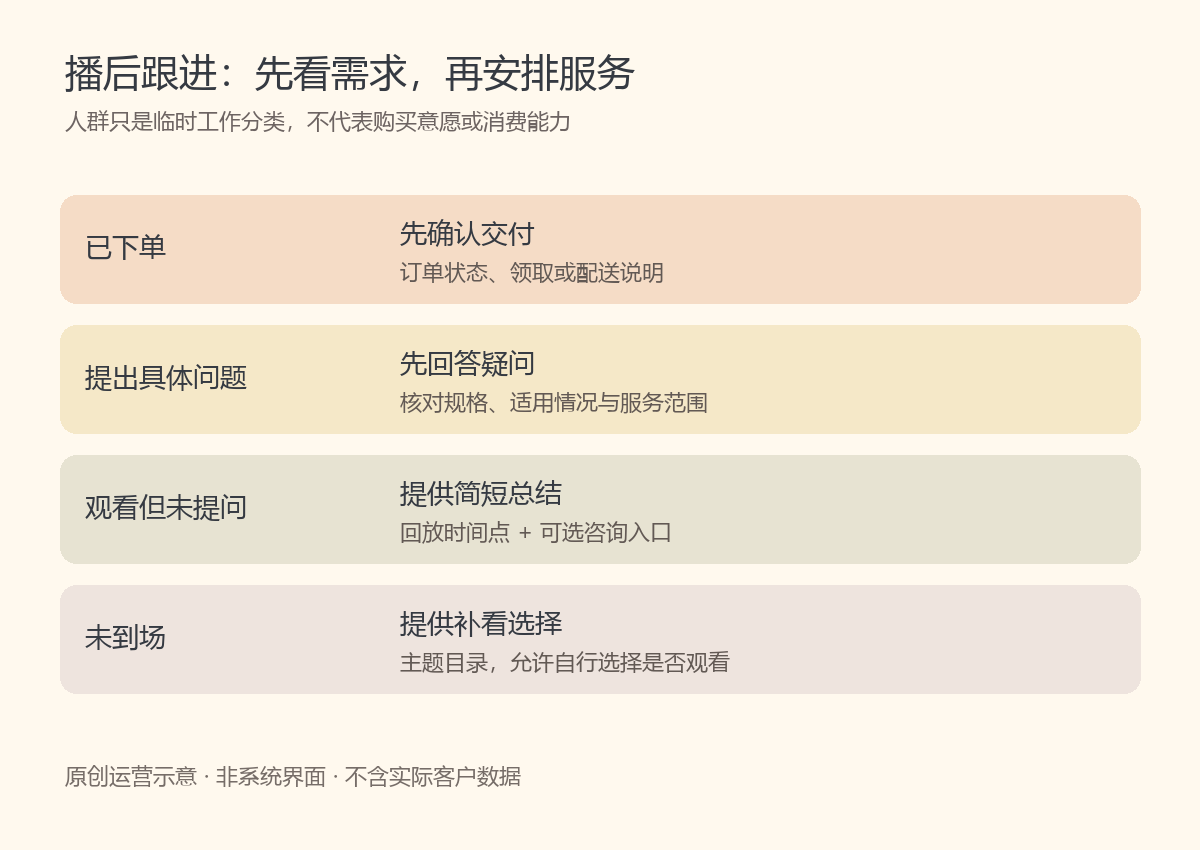
Provide different information to four user groups
For buyers, prioritize order progress, delivery or pickup arrangements, and who to contact about problems. For users with specific questions, provide accurate answers and a verification deadline for anything unresolved. For viewers who did not ask questions, offer a short topic summary and an optional consultation link. For absent invitees, share a replay index so they can decide whether to catch up, rather than treating one absence as a reason for repeated reminders.
Make replay messages help users find answers quickly
Before sharing a replay, listen to the audio and confirm that the link opens. State what the session covered and who it suits, and identify two or three actual timestamps. For example, “specifications at minute 8, pickup instructions at minute 21” is appropriate only after checking the video. Never substitute example times for a real index. Explain any outdated information, rather than presenting broadcast-day stock or promotion details as permanently valid.
Group messages can follow the order “topic summary—replay index—contact options.” Let each message solve one main problem and expand when the user wants to continue. Move personal orders, phone numbers and after-sales details to an appropriate private service channel. Do not post customer data in the group; retain only information needed for the current task.
Assign an owner and response deadline to every question
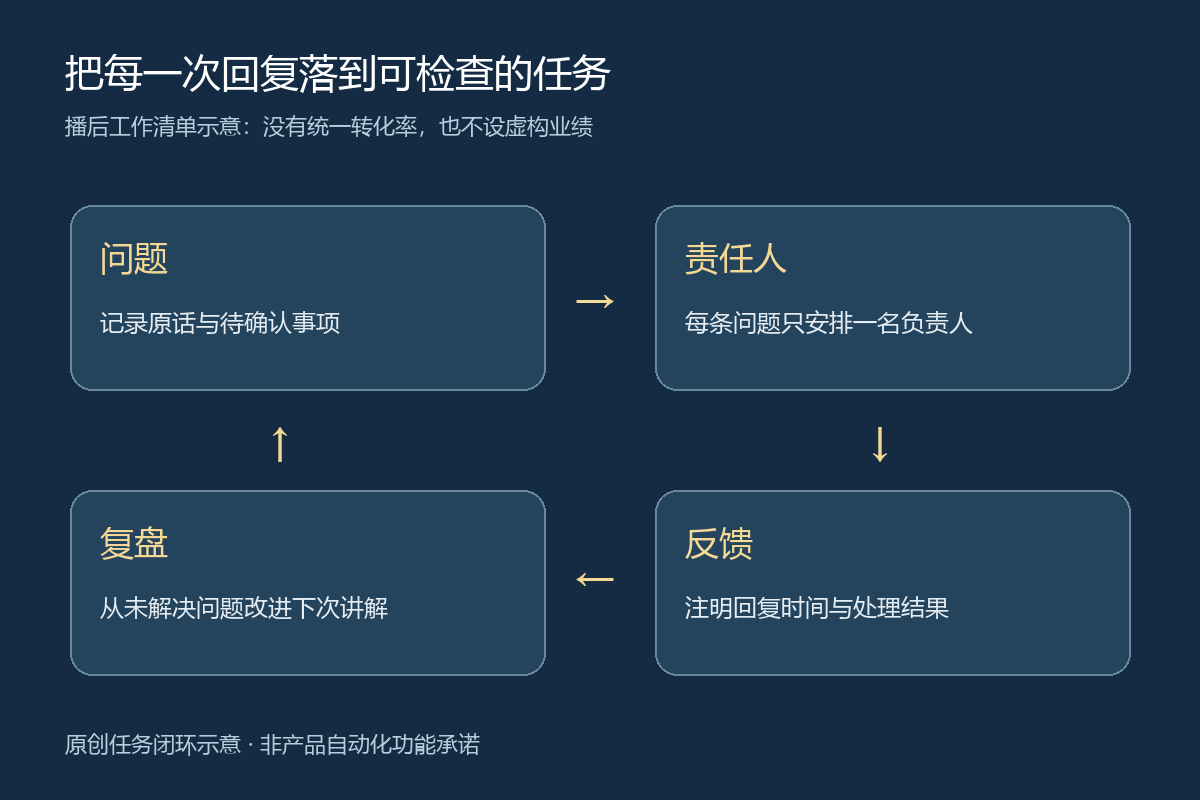
A small team does not need a complex workflow at the outset. Use an internal worksheet for the issue, owner, promised response time and outcome. The host confirms presentation details, customer service answers questions, and store staff verify pickup arrangements. Give each task one clear owner to prevent duplicate replies or people waiting for one another. After responding, mark it “resolved” or “requires further verification.” Do not record a sale without the user’s confirmation.
Review interaction, orders and service outcomes separately
Before the next broadcast, check unanswered questions, repeatedly requested explanations and orders needing extra communication about specifications or pickup. Then examine attendance, viewing, inquiries and orders. Distinguish people from event counts and mark cancellations and refunds separately. Data from different sources, topics and event conditions should not be combined into one conversion rate, and viewing time should not be used as proof of satisfaction.
Improve one issue per round, such as explaining pickup earlier or adding a verified replay index. Use consistent definitions in the next session to see whether repeated inquiries decrease. Also record changes in products, timing and audience, so every change is not attributed to a single script.
If you plan to use livestream software for community operations, check recording capabilities against Guankeyun’s community analytics features and read the livestream interaction and content-management overview. Start with answered questions, supported orders and indexed replays, then refine the follow-up process over time.